
ShipETA Pro
A passage-plan ETA & required-speed calculator for the watch officer. Import your route, edit waypoints in a full desktop table, and let ShipETA Pro solve the times — or the speeds — for the whole voyage. Everything stays on your machine.
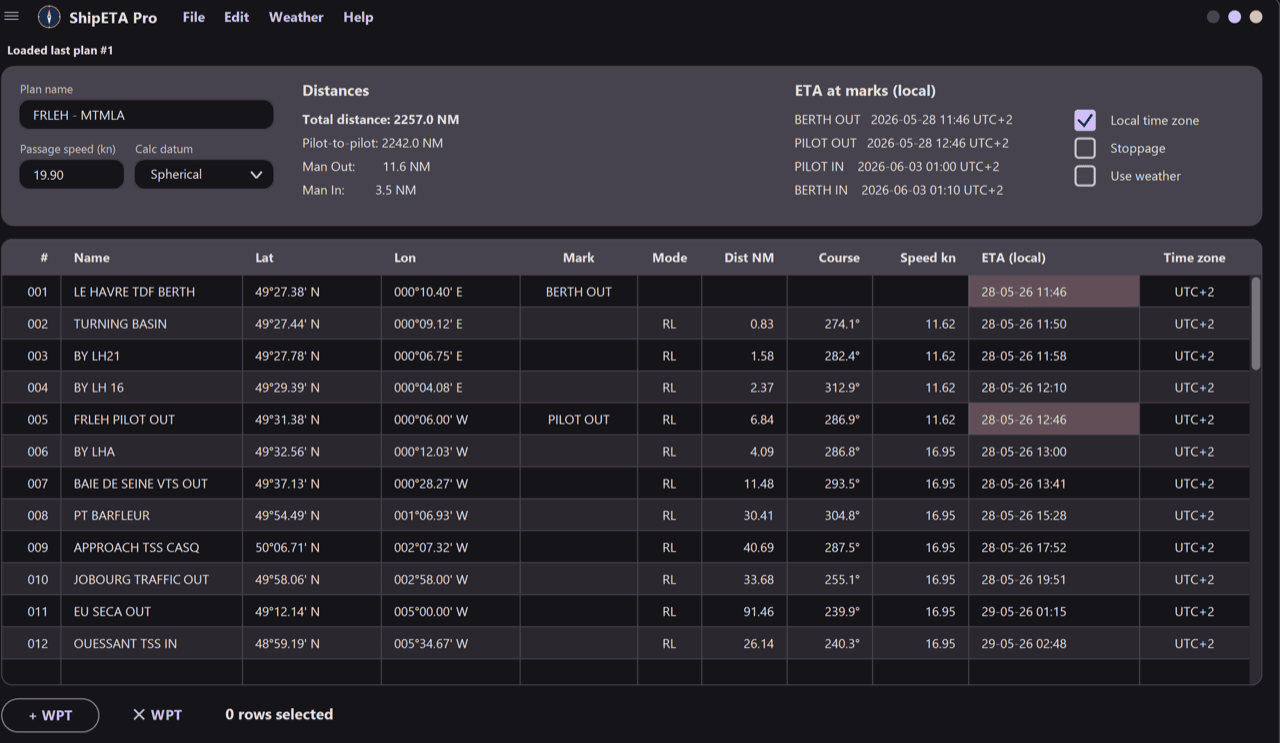
What ShipETA Pro does
Designed around how passage plans are actually worked — fast cell editing, real route formats, and the geodesy to match your ECDIS.
Imports industry routes
Loads .gpx, .route (Wärtsilä/Transas XML), V2PS .xml and .rtz (CIRM / IEC-61174). Format is auto-detected from the file.
ETA & required speed
Lock speeds to solve for ETAs, or lock ETAs to solve for the speed you need to make each waypoint on time.
Stoppage column
Add a wait (dd:hh:mm) at any waypoint — it flows into that ETA and every leg downstream automatically.
Time-zone aware
Display and enter each waypoint ETA in local time. The zone propagates downstream until you set another.
Two Earth models
Switch between Spherical (60 NM/° V2PS-compatible) and WGS84 (Vincenty geodesic, ECDIS/GPS-compatible).
Portable & offline
Every plan is saved in a local SQLite database next to the executable. No account, no internet, no cloud.
Download ShipETA Pro
A single download, no installer and no sign-up. Unzip it anywhere and run — your plans live in a portable database right next to the program.
Version 0.2.0 · 64-bit
- Windows 10 or 11 · 64-bit
- No installer — unzip and run
- ~5 MB including runtime libraries
- Works completely offline