
CargoWatch Assistant
A BAPLIE bay-plan viewer for the cargo watch. Open the stowage file, pick the port of stay, and see exactly which boxes come off and go on. Mark moves as you work them to track what's left, log crane rates, and let CargoWatch project your ETD — all on your own machine.
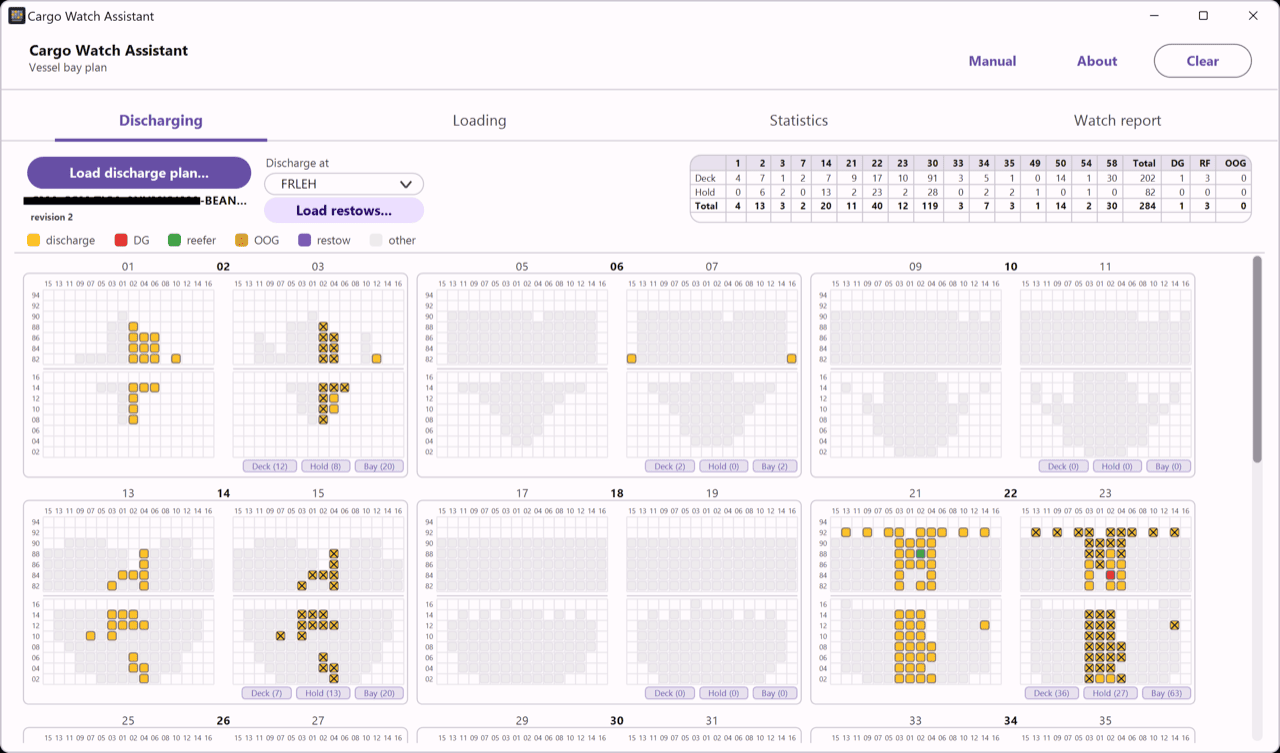
What CargoWatch Assistant does
Turn a raw BAPLIE file into something you can actually read on watch — an interactive bay plan and a recap that matches the office numbers cell-for-cell.
Reads EDIFACT BAPLIE
Loads container-ship stowage lists straight from the .edi file — ISO 6346 sizes, reefers, DG, OOG and VGM weights are all decoded for you.
Interactive bay plan
Separate Discharging and Loading tabs draw the ship bay by bay — deck above the hatch line, hold below — with 40/45ft boxes spanning their odd-bay halves automatically.
Port-of-stay highlighting
Pick a port and only its boxes light up: DG red, live reefer green, OOG orange, everything else yellow — the rest fade to gray.
Track remaining moves
Mark containers as you work them — the bay plan and statistics always show the moves still left to discharge and load, dropping in real time.
Crane rates & ETD
Log the time and cranes at each check; CargoWatch computes moves/hour and moves per crane, and projects completion — ETD from the latest rate and the overall average.
By-port cargo recap
A numeric recap aggregates boxes by port of loading — 20/40/45, totals, RF, DG, HC, OOG, weight and TEU — plus per-bay discharge / load stats.
Download CargoWatch Assistant
A single download, no installer and no sign-up. Unzip it anywhere and run. Pick the build that matches your Windows — most modern machines are 64-bit.
Version 1.0.0
- Windows 10 or 11
- No installer — unzip and run
- 64-bit and 32-bit builds
- Works completely offline